
How SAP Build Process Automation Works with the S/4HANA Public Cloud: A Practical Example

To model and automate processes easily and without in-depth programming knowledge – that is what SAP Build Process Automation, or SBPA, promises. But what can the solution achieve in conjunction with the SAP S/4HANA Public Cloud?
The digitalisation of business processes is at the top of the agenda for many companies. With SAP Build Process Automation (SBPA), SAP offers powerful low-code services that enable users to model and automate processes efficiently – all without developer knowledge and source coding. Sounds great, so should you jump in?
The fundamental question that arises when looking at SAP BPA is: Do you buy a ready-made solution with clearly defined functions, or do you develop something yourself? As is often the case today, the answer is usually not just an either-or between SAP standard and classic in-house development in ABAP – especially since SAP, alongside SBPA, also provides other implementation options such as the RESTful Application Programming Model (RAP) or the Cloud Application Programming Model (CAP), which offer different approaches for developing cloud-native extensions.
Therefore, we conducted a practical test and set up an internal use case to demonstrate how SBPA can be used alongside the SAP S/4HANA Public Cloud to optimise processes and increase responsiveness.
Our use case: Customer Notification for Sales Orders
It is a scenario that often occurs in corporate everyday life: Whenever a new sales order is created in the SAP ERP system and exceeds a certain configurable amount, such as €10,000, an email should automatically be sent to the relevant customer. Sounds simple, right? The devil is – as often – in the details.
So let’s take a closer look and start with the architecture and setup of the process. The following SAP services were used:
- SAP S/4HANA Public Cloud as the ERP system
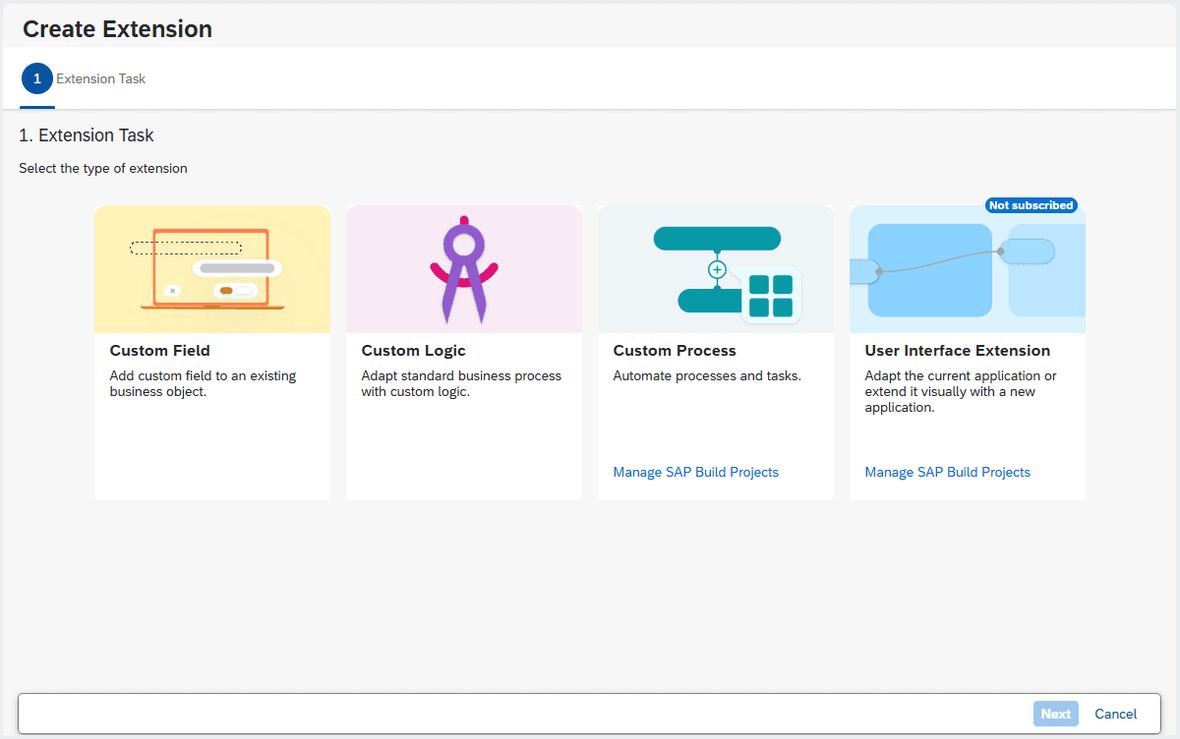
- SAP Extensibility Wizard
- SAP Event Mesh to forward events from the cloud to SBPA. (Alternatively, we also successfully tested SAP Cloud Application Event Hub)
- SAP Build Process Automation (SBPA) as the central workflow and automation tool & SMTP server configuration
- Standard APIs from S/4HANA Public Cloud to query additional data.
Even at a glance at the list of components, it becomes clear: It gets a bit more complex. After all, these solutions and systems must and should work seamlessly together if a clean process is to emerge in the end. In detail, the SBPA flow works as follows:
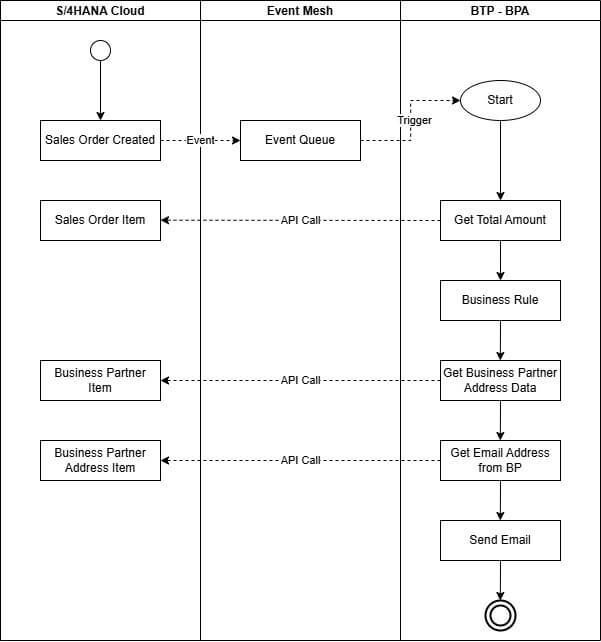
The flow starts with an event from the SAP S/4HANA Cloud when a sales order is created. This event is transmitted to SBPA via the Event Mesh, after which the automated process is executed. The following steps are therefore followed:
- Trigger by Sales Order Event: The event can either be configured with a wizard or manually via the SAP Business Accelerator Hub.
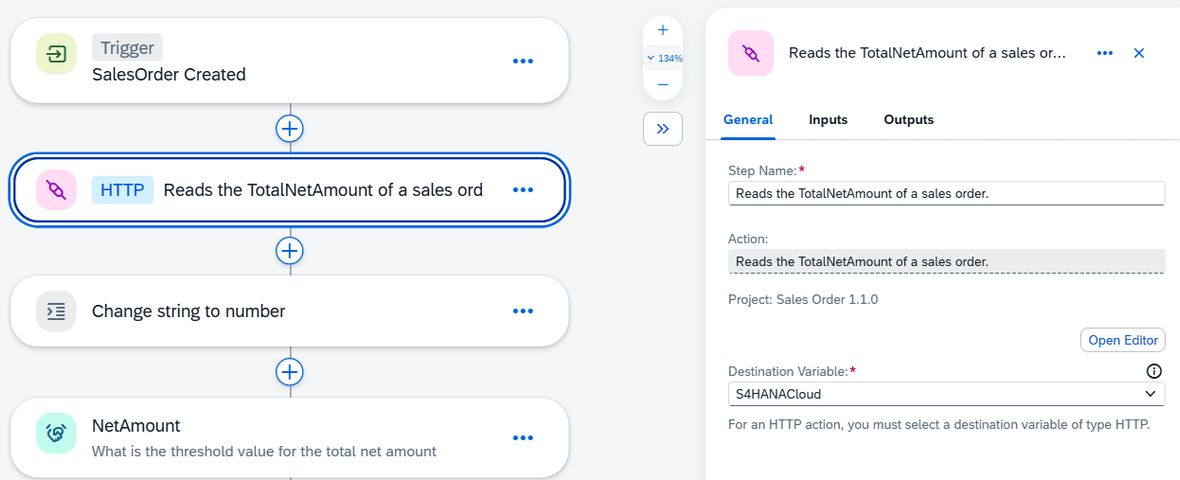
- Data Enrichment via API: Since the event only provides limited information, a complete dataset for the sales order (e.g. total amount) is queried via an API call through a so-called action.
- Data Processing and Rule Checking: The received amount is converted from a string to a number. Subsequently, a business rule checks whether the amount exceeds €10,000. By using a rule, this can even be maintained by specialist departments, for example via Excel.
- Determine Customer Email: Through further actions, the customer address is queried based on the ShipToParty and ultimately the email address. This involves a multi-step process, as the data is distributed across different APIs.
- Sending the Notification:
As soon as the email address is available and the condition is met, the message is sent via a configured SMTP server.
How well does it work? Insights from practice.
The implementation of the flow revealed exciting insights. SAP BPA enables flexible, modular process modelling with clear approval steps and process monitoring. Versioning allows for the management of various process variants out-of-the-box. The use of business rules and templates makes the solution easily accessible and adaptable for specialist departments, and with the integrated store in the SAP Build Lobby, numerous additional templates from both SAP and third-party providers are available.
However, there were also some challenges to overcome. The initial setup effort for the services, including all connections, authentication, and permissions, was relatively high compared to process modelling. Additionally, not all data sources provide the required information directly, necessitating multiple API calls. And when changes are made to rules or actions, the flow must be published again.
Our conclusion: Low-code with SBPA is a real added value for SAP
Our project has shown: SAP Build Process Automation is a powerful tool in conjunction with other SAP Cloud Services and eventing to efficiently automate workflows with and without approval processes in SAP systems. The promise of making it possible for less tech-savvy users without in-depth coding knowledge has largely been fulfilled. Particularly those who have already worked with tools like Microsoft Power Automate will find it easy to navigate.
Nevertheless, it remains true: A certain technical foundation, especially when dealing with APIs and system connections, is still necessary. However, those who take this step benefit from high flexibility in adjustments and extensions and ultimately from significant efficiency gains in everyday operations.
SBPA offers a middle ground: Instead of having to build elaborate custom workflow services or maintain expensive custom extensions, smart automations and extensions can be realised with minimal coding effort. The central question from above is therefore no longer just 'Standard or custom build?', but rather 'Should I undertake a complete custom development, or is a configurable low-code flow that covers 80% of my needs sufficient?'
Especially for companies transitioning from the 'old' SAP world to the 'new' cloud world of the SAP S/4HANA Public Cloud, SAP SBPA is particularly interesting. Because it is not just about technical migration, but also about a change in thinking regarding process design – moving away from hard-coded custom developments towards modular, flexible, and low-maintenance automations.


