
SAP & external AI – is that possible?

AI is on everyone's lips. Some time ago, we began to engage with the topic. One of the questions: What possibilities are there to use non-SAP AI together with SAP, and how easy is it? We looked at a simple case.
AI is on everyone's lips. So it is at SRB. We started engaging with the topic both inside and outside SAP some time ago. One of the questions: What possibilities are there to use non-SAP AI together with SAP, and how easy is it? We examined a fairly simple case – a bot for Microsoft Teams.
AI is here to support processes and workflows and simplify all our working lives, is the general consensus. So far, so good. But does this hold true when combining non-SAP AI and SAP?
We wanted to put it to the test and had an idea: to provide information from SAP in MS Teams as simply as possible without logging into SAP or having knowledge of transactions and their functions. Because as we all know: The login process for SAP Cross-Application Time Sheets (CATS) on the web or in the SAP GUI can be 'cumbersome'.
Retrieving SAP information via MS Teams chatbot – how easy is that?
The aim of our small project was to investigate the capabilities of artificial intelligence (AI) in extracting structured information from SAP for unstructured queries. Or more concretely: We wanted to develop a chatbot in Microsoft Teams that enables employees to retrieve relevant information from SAP using natural language. In our example, working hours.
At the beginning, we defined 10 questions that the chatbot should answer. For example: 'What are my working hours from last month?' I found two different options during my first brief look, and I chose one:Power Virtual Agents (PVA), a low-code service offered by Microsoft. I initially discarded the other option, which was to programme the bot myself and run it on a server, although I realised I would have had more freedom there and would not have been so restricted in terms of functionality.
In PVA, it is possible to connect a Power Automate flow via special 'cards'. Since PVA alone does not offer many options, most of the logic is implemented in Power Automate. Here, information is processed and prepared using loops and conditions.
To recognise the intents or questions of users, an AI model is still needed. Naturally, ChatGPT immediately came to mind... but not without concerns. The central questions that arose were whether and what information would be stored and whether the recognition of different sentences would always return the same information. After careful consideration, we ultimately decided against ChatGPT for exactly these two reasons.
After careful consideration, I chose theCognitive CloudfromMicrosoft Azure.This can also be integrated via special actions in Power Automate.
To format the output and present it more attractively, Azure Functions were used. These allow code to be written in predefined programming languages and executed serverlessly. For retrieving data from the SAP system, API management and a pre-existing service (CATS) are used. The data can be retrieved via an HTTP request.
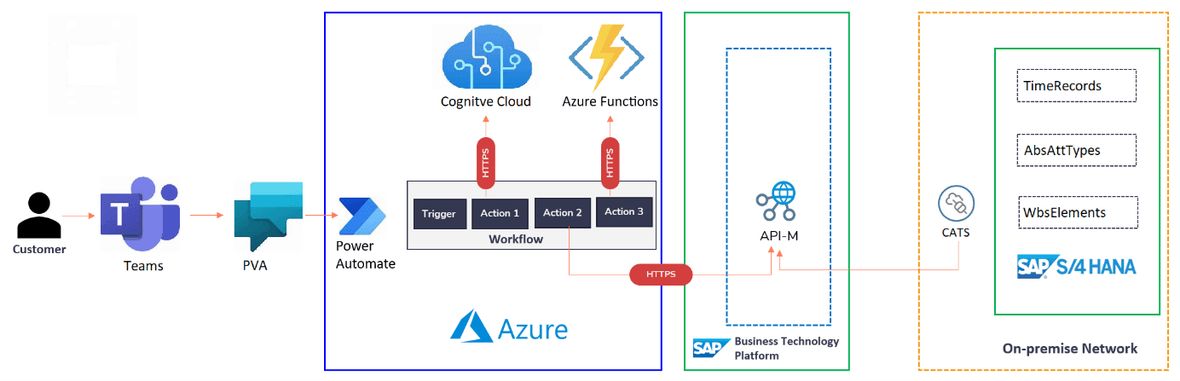
An AI workflow in the making
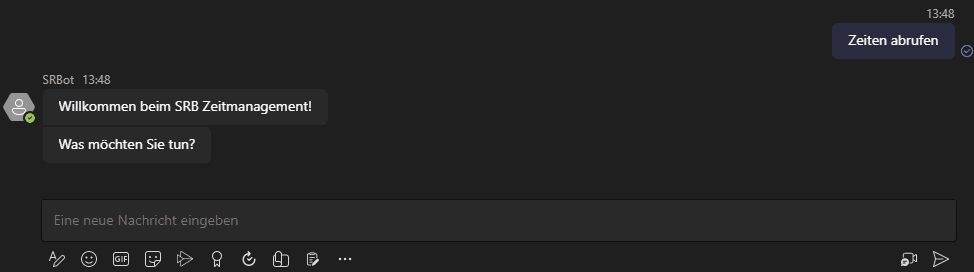
So how does it all work? Microsoft Teams is our starting point. Here, a new chat partner appears, in our case the chatbot we named 'SRBot'. To ask specific questions, one must first call up the appropriate topic. This can be done via several commands, such as 'Open SRB Time Management' or 'Retrieve times'. This starts the corresponding topic as a flow in PVA. Then one of the 10 questions can be asked, even in a modified form.
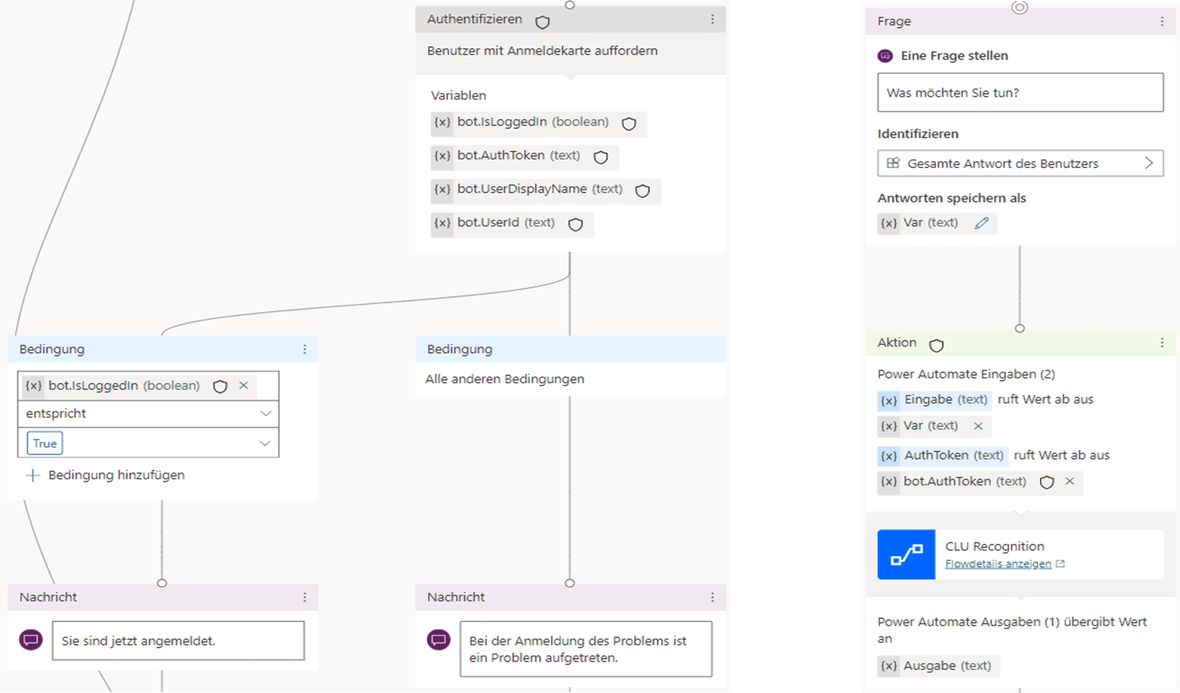
The security card, visible in the lower left image, logs the user in with their Microsoft credentials. When one chats with the bot for the first time, they are prompted to log in with their company email address. The login generates an AuthToken, in which important data about the user is encrypted. This will be important later.
The right image shows how Power Automate is called. Here, the user's question and the AuthToken are passed to the flow. Only the output is returned, which is then sent back to the bot as a message by PVA.
In Power Automate, the individual steps are then combined and coordinated. On one hand, the request comes from PVA, and on the other hand, requests are made to the Azure Cognitive Services and the SAP system.
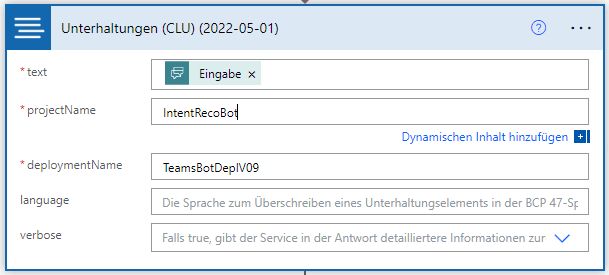
The variables themselves are initialised inCLU Recognition.A pre-made component sends a call to the Azure Cognitive Services, and the user's question is passed on. Depending on what the component returns as a response, i.e., which intent is recognised, different follow-up flows are called.
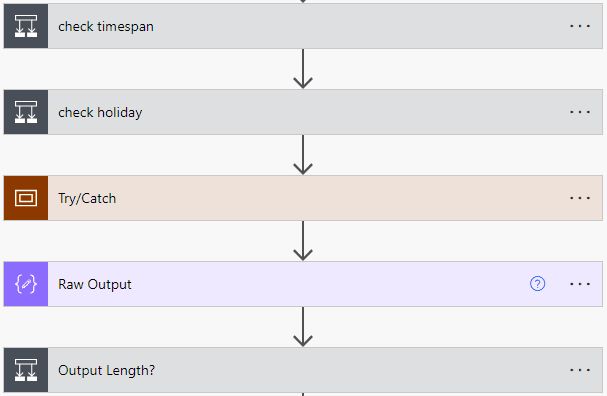
In theTimeRecordsRequestthe flow also starts with the initialisation of variables. Then the parameters, i.e., the two dates, are formatted appropriately and checked to see if a period is being queried or just a single day, and then whether only a certain type of time entries, such as holiday or sick leave, is needed.
Subsequently, there is a try and catch block in which an HTTP request is made to the SAP CATS service. If the entries are empty, a pre-made message is returned. Otherwise, the result is processed and prepared for output, depending on what the user's intent was.
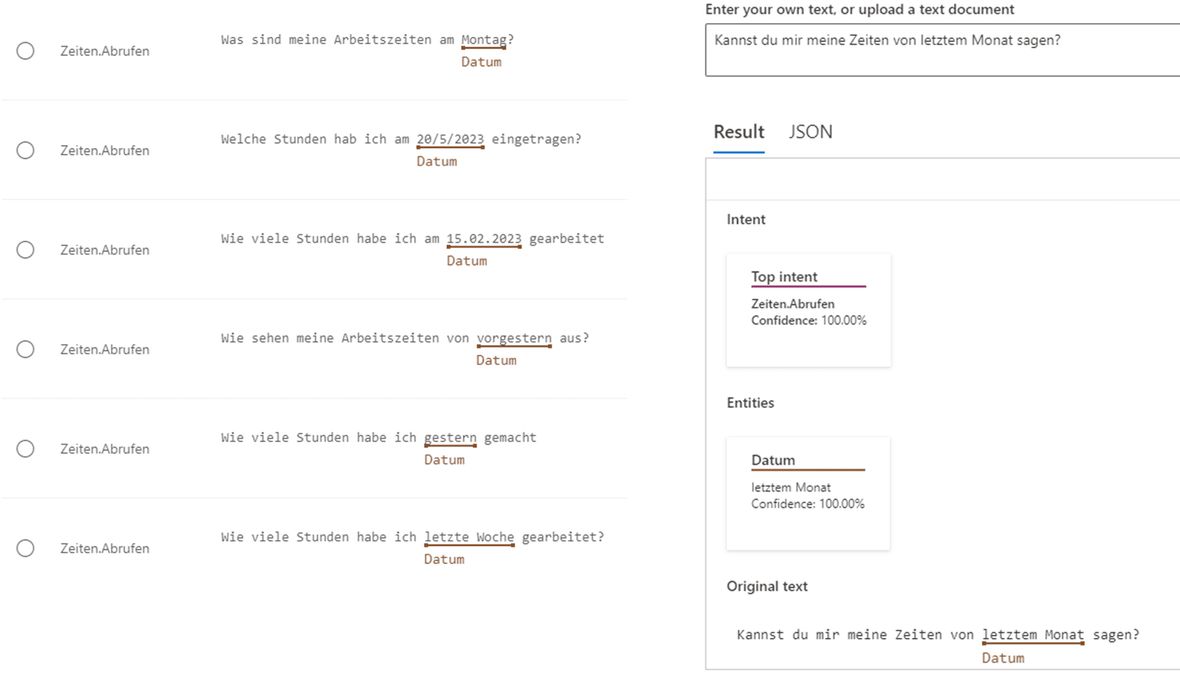
In theLanguage Studioa language understanding model was created that can classify the intent of a sentence into predefined categories. For this, many example sentences are written and assigned to a self-created category. In our case, 'Retrieve Times'.
Additionally, other important key features, the entities, are recognised. There are different possibilities here: predefined categories that autonomously recognise the entities, machine-learned entities that can be annotated in the sentences and are determined by their position, as well as RegEx patterns.
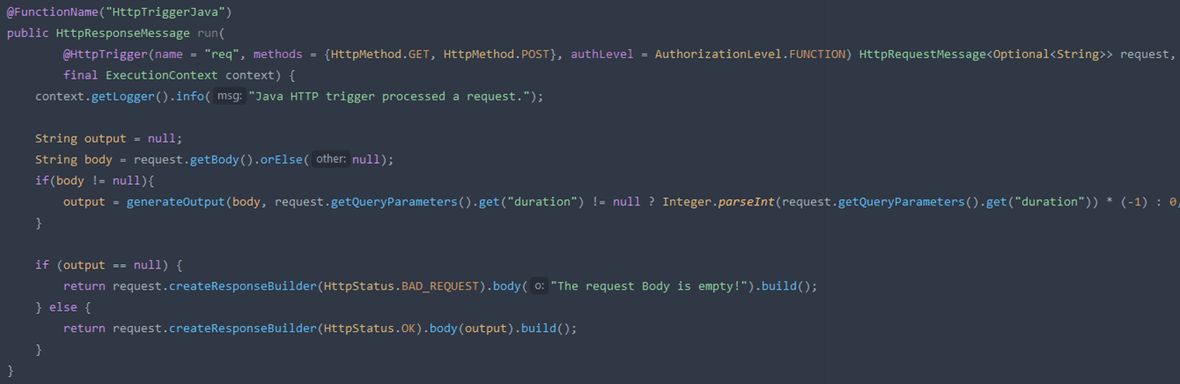
Since Power Automate becomes very quickly very confusing with more complex tasks, I used Azure Functions for the output. Here, one can choose from several predefined programming languages, and the function can be accessed via an API call. The data for output is sent in the body to the URL, then processed for output by the function and sent back.
And how good are the results?
The bot was able to answer all known questions without any problems. Remaining or new questions could be implemented with relatively little time investment. After all, the basic framework of the programmes and interfaces is already in place. There would also still be the possibility of obtaining a detailed view or a summary of the hours, but this currently only happens for certain queries.
The bot takes about 10 seconds to respond. This is quite long, but considering the structure of the workflow, it is still acceptable. This time is mainly due to the many blocks in Power Automate, but also due to some requests to other services. Due to the choice of PVA and Power Automate, many interfaces have arisen where time is lost. As a result, it sometimes takes longer for the bot to send a response.
All this shows that Power Automate is really only suitable for small logics. Once a bit of complexity comes into play, it becomes very quickly very confusing. Therefore, I also chose Microsoft Azure Functions for data processing. Here, one can achieve a result in a much clearer and better way. The downside, however: one more interface.
Moreover, it is disheartening: with Microsoft, one must pay separately for each product. But at least one can test these for a very long time for free to assess whether they fulfil their actual purpose. The prices of Microsoft Azure solutions are very confusing, and it is difficult to find the exact or best price for one's individual use case, as there are often different payment methods, e.g., packages with certain limits or 'pay as you go'.
For the AI model, there is also only a limited amount of data available for training. Furthermore, in Language Studio, the search mainly focuses on the position of the keywords. These two points together can make it difficult to recognise the right keywords or cover a wide range of intents.
All in all, it can be summarised that non-AI solutions work with SAP but do entail a certain effort. However, the quality is completely acceptable. However, looking at the speed at which AI is developing and the hype surrounding the topic, it can be assumed that this will soon become a true commodity in everyday work.


