
SAP FIORI – Flexibility as the Key to UI Customisations

SAP offers several hundred SAP Fiori applications. But how to maintain control and overview when customisations or changes are needed? The solution is built-in and has a name: Flexibility and Personalisation.
As an app developer at SAP, you have the agony of choice. SAP offers several hundred SAP Fiori applications – and each of these applications is developed with specific business roles and a general understanding of the business process in mind. Typically, these apps provide only one method and one style for executing a business process.
But what to do when companies execute such a single business process in different ways? What if customers request changes to SAP Fiori apps to meet their diverse business requirements? It is clear: UIs must be extended. But how to maintain control and overview over changes and the presented business process while not overwhelming developers?
Built-in Flexibility
This is made possible by the flexibility of UI5 and the built-in capability for personalisation. This supports users who work with business applications in their own way and according to their own preferences.
For SAP's flexibility features enable upgrade-safe, cost-saving, and modification-free UI changes at various levels and can be carried out by different user types – defined as End Users, Key Users, and Developers.
Source: SAP
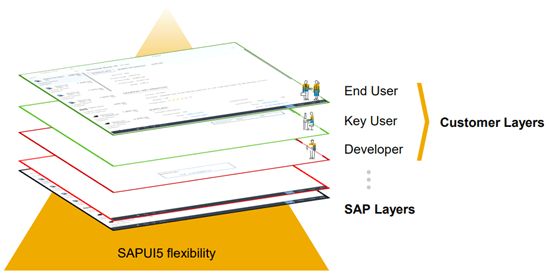
Therefore, when changes are necessary, they can be easily implemented by different users without triggering conflicts elsewhere or having changes overwritten by others. In other words: Changes from different personas are stored independently in so-called layers (see graphic) and can be applied from various layers.
What 'SAPUI5 Flexibility' Means for Every User
For theEnd User, it is all about better usability and thus ultimately a better user experience. End Users can personalise the application interfaces to better meet their personal requirements when using the app. The corresponding personalisation can clearly be saved for future use, so it does not have to be repeated each time. Additionally, End Users can easily switch between personalised views.
The most common and standard customisations during the personalisation of an app include filters, sorting, and modified table views. For example, additional columns can be added or cards on overview pages can be changed. End Users work directly with and in the UI application. No special knowledge or tools are required for this.
Source: SAP
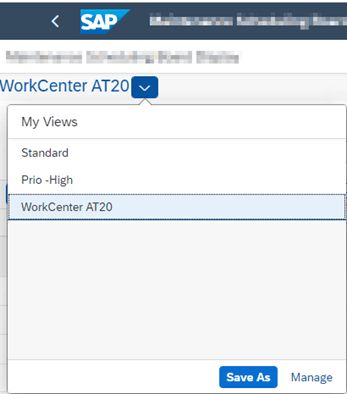
Key Usershave additional rights compared to End Users. For instance, they can carry out certain code-free customisations of apps for multiple End Users at once.
Key Users simply switch to the customisation UI mode and can freely and independently make the desired changes, such as altering screen texts, rearranging fields or sections, or even embedding content from external applications like maps – all without programming or involving the IT department. Finally, they can easily make the customised app available to other users depending on the platform used. Practically child's play!
Source: SAP
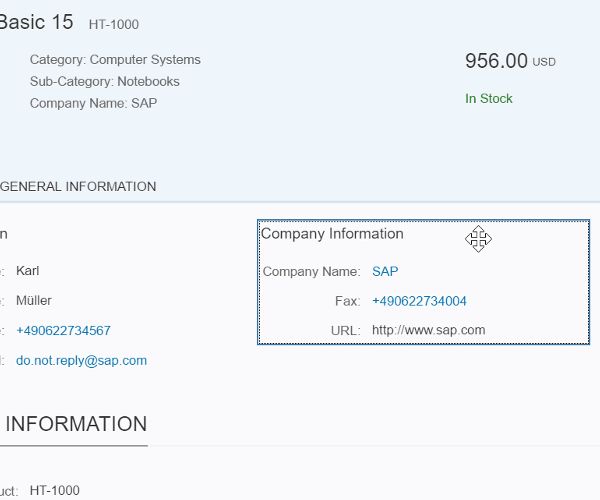
However, if more complex customisation scenarios are required, such as implementing a custom user interface or new business logic as an extension, it takes real app experts, highly trusted individuals who can handle these challenging tasks – theDevelopers(who else 😉)!
Developers can add or modify complex business logic, business objects, or applications by adjusting or replacing views, extending or replacing controllers, or changing language-specific texts.
All this happens while considering the decoupled software lifecycle of the standard app and the extensions. The standard app itself is not altered. What happens is that the customised application becomes the launch project. The standard application is thus started with the additional extension configuration, allowing End Users to experience a tailored user interface. And this also offers the possibility to add their own application variants for custom requirements while still receiving all upgrades of the original application.
Minimal Effort, Maximum Gain
Even though the apparent flood of SAP Fiori possibilities may seem overwhelming, the flexibility presented here based on the significance of the SAP user experience principle simplifies things considerably. Moreover, this flexibility plays a crucial role in achieving customer goals, improving the overall business experience, and empowering business users to discover, configure, and manage processes. Thanks to SAPUI5's flexibility features, customising the user interface of SAP Fiori apps to meet business requirements is no longer a complex process!


