
The Future is Now: Apple Runs SAP
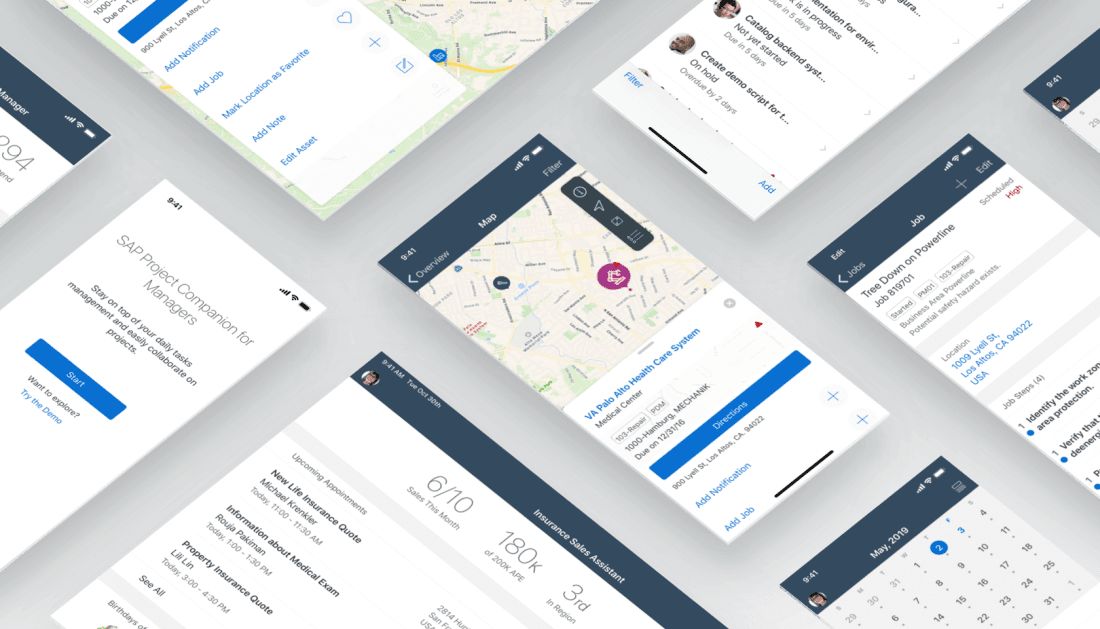
Why is this significant and what does it mean for the user experience of our customers?
With the iPhone and its mobile operating system iOS, Apple has practically reinvented the term 'Digital User Experience'. This absolute user-friendliness is increasingly entering the professional realm. At SAP. For Apple, and together with Apple..
It is 7:30 AM. My alarm rings. I check on my iPhone in the Notification Center if friends have sent me a message. A quick breakfast, then I swipe to the widgets. I see when the next train arrives and know whether I need to hurry or can stroll to the station.
This is how, or at least how similar, my morning goes. My personal, morning, digital user experience. Private apps have seamlessly integrated into daily life for a long time, shaping my very own iOS user experience. Simple, clear, personalised for me, and with real added value.
User Experience de Luxe even in professional life
Once at work, it often ends with the seamlessly integrated user experience. Here, the constant demand for passwords across various services. Here, countless clicks to get the desired information. Does it have to be this way?
The clear answer is No. The answer from me and the answer from SAP. Because SAP has quite a bit to offer in this regard. For an excellent mobile user experience in enterprise applications. For an excellent user experience on iOS devices.
1. SAP Fiori for Web
SAP Fiori is practically the webkit for intelligent, complex web applications. Classic web applications in the SAP Fiori look are created here. With each release of S/4, SAP delivers new standard Fiori applications across various modules. These adapt responsively to the display size used and can therefore be flexibly and easily used on iPhone, iPad, and PCs.
This is ideal for processes already covered by a standard Fiori application and that do not require offline functionality. However, integration into the iOS operating system for features like push notifications, widgets, Bluetooth access, etc. is not possible.
2. SAP Business Technology Platform (BTP) SDK for iOS
The SAP BTP SDK for iOS is a framework developed together with Apple to merge the Fiori look & feel with the familiar iOS user experience. Combined with SAP Mobile Services (powered by SAP BTP), customised and fully integrated iOS apps can be created. For this purpose, a unique 'Fiori for iOS' Design Languagehas been developed, following the so-called HIG (Human Interactive Guidelines) and thus allowing for an intuitive user experience on iOS devices.
SAP itself uses this technology for apps that represent standard processes. Currently, the SAP IT portfolio includes over 30 native iOS apps developed and rolled out using the SAP BTP SDK for iOS. These apps cover a wide range, starting from least cost routing with non-SAP groupware integration to self-services with SAP connectivity.
The latest of these applications is SAP Mobile Start (currently still in beta). This is a client for the SAP Launchpad Service (powered by SAP BTP) with widgets, push notifications, and much more.
3. SAP Mobile Development Kit
With the SAP Mobile Development Kit, the development of a mobile application occurs using metadata and JavaScript. These are translated into native codes at runtime. Updates can be centrally created and distributed thanks to SAP BTP Mobile Services. However, SAP currently only offers a few applications based on this, such as the SAP Asset Manager.
The SAP Mobile Development Kit is ideal for applications that require offline functionality or should be developed in-house without iOS knowledge (Swift/Swift UI). Existing applications, like the aforementioned SAP Asset Manager, can also be extended. However, integration via widgets or shortcuts is not possible.
Planning Decides
What the right choice for your mobile application on iOS is, is hard to say. Each of the technologies has its strengths. Therefore, SAP develops and maintains them in parallel and independently. It is always interesting and challenging to find the appropriate architecture in the conceptual phase of a project.
Because, as with many other projects, the same applies here: Proper planning is half the battle. Therefore, it is advisable, for larger projects, to conduct a multi-day workshop before development begins together with SAP and a competent and experienced SAP partner like SRB – preferably also with designers and developers from Apple. This makes it easier to determine which technology is optimal for your specific use case, with which technology the developed application integrates even more seamlessly into the iOS user experience.
SAP runs iOS & Apple runs SAP
While writing this article, I have been able to gather quite a bit of reading material, the content of which would exceed this framework, but is nonetheless interesting.
SAP Apple Partnership Landing Page
SAP Porsche Motorsport iOS App Example
SAP Fast Start with Partners (Prebuilt iOS Solutions Overview)
SAP Business Technology Platform (Product Information)
SAP Mobile Services (Product Video)


