
SRB goes SAP S/4HANA, Part 3: In Three Days to the New Environment

Our move to SAP S/4HANA was an exciting journey. After completing all our homework, the test was now at hand. Or rather: We are moving. In Episode 3, the focus is on the deployment phase.
The SAP S/4HANA journey continues. We had done our homework: The phases Discover & Prepare and Explore & Realize were behind us. Now it was serious. It was time to move. Three days full of tension. Three days of deployment that were worth it.
Deploy – we are moving
Then – we prepared for the GoLive. A date was quickly found. After all, we had a clear goal in mind: to complete the project before Christmas, preferably before the SRB Christmas party, to toast our success there. So it was the last weekend of November when the move was to take place.
But before that could happen, we also had to incorporate the preparatory activities into the cutover plan. This included planning the allocation of permissions, conducting a new pre-check, preparing for the new productive system, transports, etc. It was also important to inform all our external partners and internal colleagues about the GoLive, as this meant that the system would not be available for three days.
Here’s a brief look into our project management:
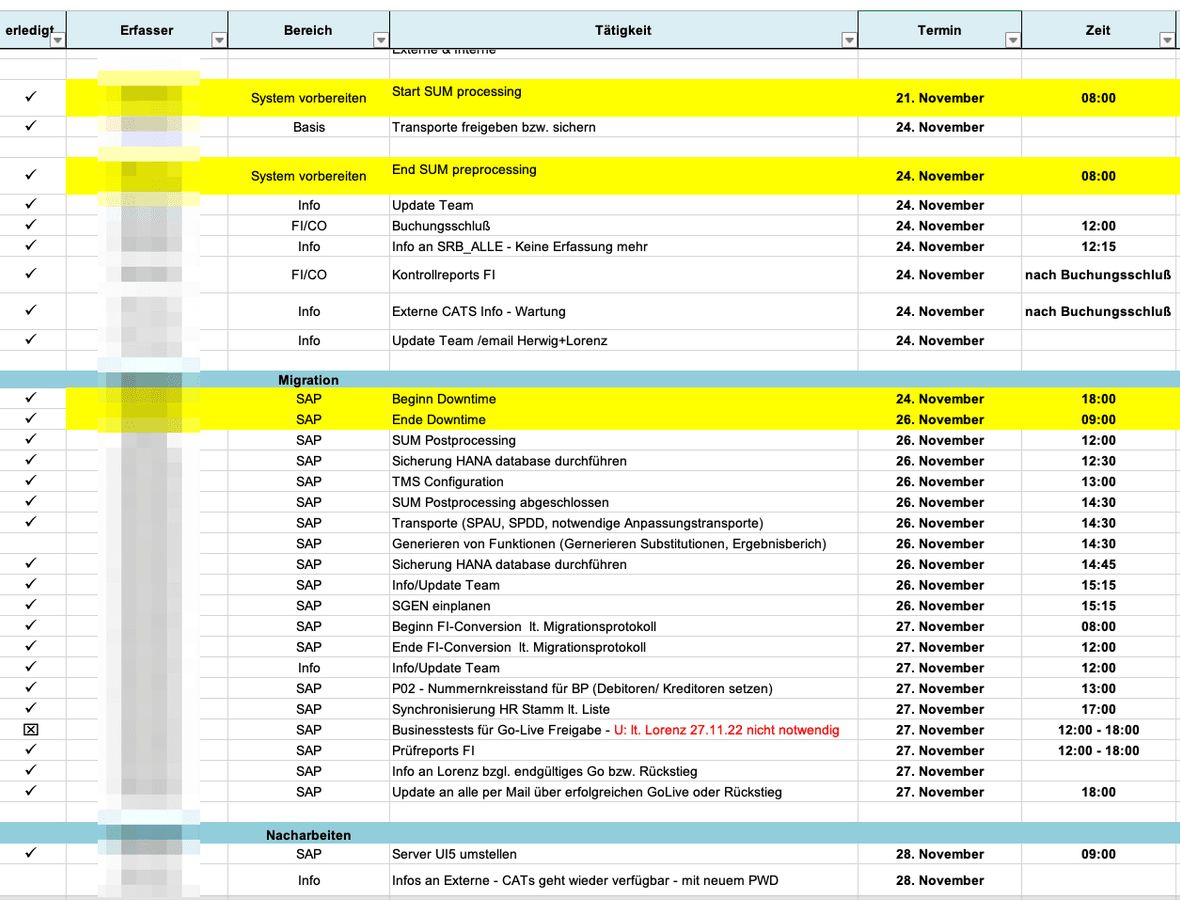
The steps for the technical conversion using the Software Update Manager (SUM) also had to be planned. This distinguishes between an Online Phase, where activities for the transition already take place in the background, and a Downtime Phase.
The downtime phase in connection with SUM refers to the period during which the SAP system is unavailable during the upgrade or update process. During this phase, various activities are typically carried out that cannot occur in parallel with normal system use, such as data migration, adjustments of software components, and testing.
The downtime phase is a critical part of the upgrade process, as it can impact business activities. Therefore, it is important to keep the downtime as short as possible to minimise disruptions for the company.
Typically, various measures are taken to optimise downtime:
- Efficient planning: Detailed planning can help minimise downtime. It aids in conducting activities efficiently and identifying potential problems in advance.
- Parallel activities: If possible, various tasks are carried out in parallel to shorten the overall duration of downtime. However, these require careful coordination.
- Performance monitoring: During the downtime phase, the system's performance is monitored to ensure that everything proceeds as planned. If problems arise, immediate action can be taken to minimise delays.
- Process optimisation: After the upgrade is completed, the processes carried out are analysed to identify potential improvements for future upgrades and further minimise downtime.
The exact duration of downtime depends on various factors, such as the size and complexity of the SAP system, the hardware and network infrastructure, as well as the specific requirements of the upgrade or update.
For all these points, the learnings from the conversion cycles were of great importance to us. Our department head, Herwig Stecher, had dealt intensively with this and defined an approach for our SAP S/4HANA transition. Accordingly, he was calm and confident that the transition would succeed. The only thing that briefly threw him off course on the day of the GoLive decision was the question about the licence key for our new SAP S/4HANA system, which he could not find. After a brief silence in the meeting, however, our sales manager, Harald Epner, was able to reassure him.
Accounting in Focus
In the course of the migration, the data of accounting were of particular importance to us. We planned this in three steps: Customising, the migration from SAP ECC to SAP S/4HANA, and subsequent activities after the migration.
Customising
During customising, various steps are taken to ensure that the individual configurations and adjustments in the old system are successfully transferred to the new system. Here are some typical activities related to customising for data migration in accounting:
- Analysis of existing configuration: First, the current accounting configurations in the SAP ECC system are examined. This includes reviewing customising settings, business processes, master data structures, transaction codes, and custom objects.
- Adjustment to SAP S/4HANA: Based on the differences between SAP ECC and SAP S/4HANA, the customising is adjusted to ensure that the configurations are compatible with the new database structures and functionalities of SAP S/4HANA. This may involve changes to master data, transaction codes, business processes, and reporting structures.
- Customising transfer: Existing customising settings and adjustments are transferred to the new SAP S/4HANA system. In this step, transport orders created in previous conversion cycles can also be transferred to the system. These had been created by our consultant, Veronika Wolfgruber, in earlier conversion cycles.
The customising for the migration of accounting data is a critical step in the upgrade process and requires careful planning, execution, and monitoring. Ultimately, it is essential to ensure that all individual configurations are successfully transferred and that the company can continue to operate smoothly after the upgrade.
Migration
After the customising for the conversion of accounting, many accounting data are transferred into the new database structures of SAP S/4HANA during the migration, including:
- General Ledger (FI): Booking data including booking documents and account information Master data such as creditors, debtors, general ledger accounts, bank accounts, etc. Open items and balances from accounts receivable and accounts payable
- Controlling (CO): Cost centres, cost objects, and internal orders Planning data and budgets Profit and loss account data such as cost types, cost centre reports, etc.
- Asset Accounting (AA): Asset master data such as asset classes, asset numbers, asset locations, etc. Movement data such as asset acquisitions, disposals, transfers, etc. Depreciation data and book values of assets
- Bank Accounting and Payment Processing: Bank account master data and transactions Payment and collection orders Bank statement data and automatic assignments
- Tax Accounting: Tax accounts, tax keys, and tax reporting data Tax declarations and VAT reports
- Other relevant data: Currency conversion tables and rates Reporting and analysis structures Custom settings and configurations in accounting
Only after the migration status is set to 'Completed' can users make bookings. It is important to note that SAP S/4HANA introduces new database structures and data models that enable optimisations in terms of performance, data processing, and analysis. During the migration, the existing accounting data are transformed according to these new structures and transferred to the S/4HANA database. This process often also involves adjusting data formats and transitioning to new functionalities and business processes of SAP S/4HANA.
After the Migration
Not only subsequent activities in accounting but also in other areas such as logistics are necessary here.
Another important activity in the cutover plan is validating whether the conversion of data into the new SAP S/4HANA structures has been successfully completed according to the defined business requirements. In our case, control reports were compared before and after the transition. In the last transition projects, the 'Data Transition Validation Tool' (DTVT) served us well. The DTVT is a component of the SAP S/4HANA Readiness Check. Reports from various areas are delivered:
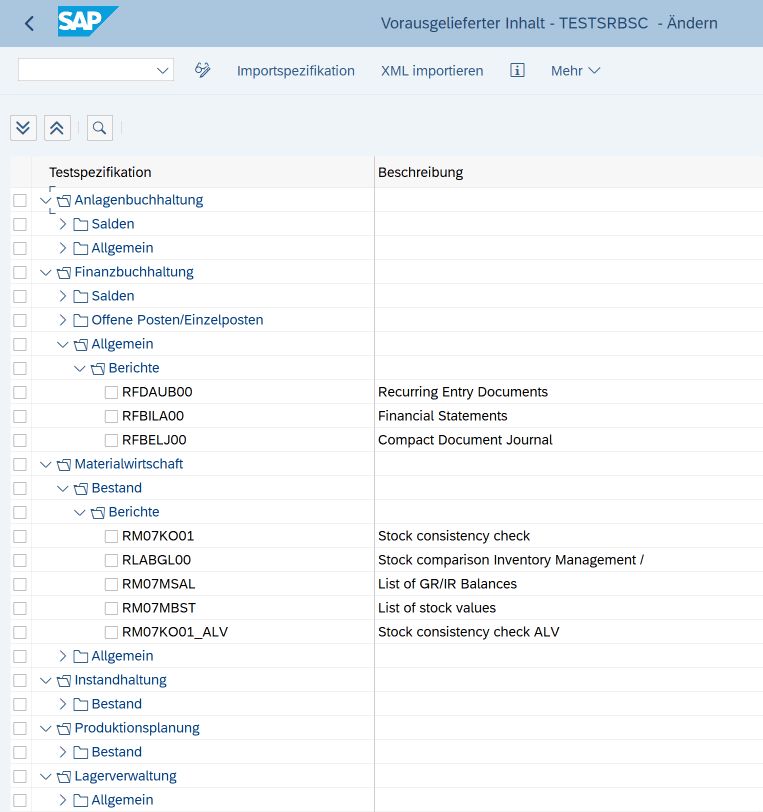
Below are some main functions and tasks of the DTVT summarised:
- Validation of data mapping and transformation: The tool checks the mapping of data between the SAP ECC and SAP S/4HANA structures to ensure that the data is transformed according to defined rules.
- Data consistency and integrity: It validates the consistency and integrity of the migrated data by ensuring that referential dependencies between different data elements are maintained.
- Completeness of data migration: The DTVT checks whether all required data have been correctly migrated and whether there are data losses or inconsistencies.
- Performance optimisation: It supports the identification of data migration processes that can be optimised to improve the performance of data migration and further minimise downtime.
- Logging and reporting: The tool provides extensive logging and reporting functions to document the status of data migration and identify potential problem areas that need to be addressed.
Our consultant Barbara Lang notes:
"The Data Transition Validation Tool is crucial for the success of a transition project. By using this tool, we can ensure that data is accurately and reliably transferred to the new system, which in turn supports business continuity and efficiency."
Not to be underestimated: Celebrating successes!
One of the most important and definitely not to be underestimated points in cutover planning was communication about the successful GoLive. This task was assigned to one of our managing directors, Lorenz Juen, and it filled him with particular joy when the time came.
It was accomplished, the transition was completed, and we had something extra to celebrate at the Christmas party. And rightly so, as a lot of brainpower, time, and energy had already gone into this strategically important project for us. Although there were still a few follow-up tasks on the agenda in the first week of GoLive, everything ran smoothly except for a few minor issues.
Only one point remained open: a barbecue for the team in Lorenz's garden. But since this was probably not the best time for such a plan just before Christmas, we had another six months of anticipation until summer arrives.
Additional Information
If you are also facing migration to SAP S/4HANA or have questions about our journey to the new platform, feel free to contact me. Additionally, I have compiled interesting additional information with further and hopefully helpful tips & tricks regarding the previous phases of the transformation journey.Info Sheet 1: Strategies & Methods Info Sheet 2: Preliminary Projects
Interested in all episodes of the SAP S/4HANA migration at SRB? Read here the first article on the phases 'Discover' and 'Prepare' and here the second article on the phases 'Explore' and 'Realise'.
