
SAP Analytics Cloud: Which version is yours?

SAP Analytics Cloud is not the same as SAP Analytics Cloud. There are several variants. But which one is the best fit for you? We provide an overview of the options as well as the pros and cons of three different approaches.
Do you remember my blog post about maintenance and BI? And that the SAP Analytics Cloud, or SAC, is THE tool for data analysis in SAP solutions? If not, either click above to read or simply stay here. Because I have found my 'love' for this tool. Me, as a BI expert? Well, it happened like this…
Some time ago, my esteemed colleague Reiner Eberhard, whom you should particularly know from the EAM Talks on maintenance, approached me. 'I have set up the demo system for PAI with SAC, you should take a look at it.' It should be noted that PAI stands for SAP Predictive Assets Insights, which will soon – thanks to further development – become SAP Asset Performance Management. At that time, I just smiled mildly at him, thinking something like 'he probably can't operate SAC…'
That this was not the case soon became evident. In any case, Reiner created a user for me and, to make a long story short: SAP has indeed packed a rather stripped-down version of SAC with Live Data Connection. And by stripped down, I mean really simplified. Reiner only said: 'Even a non-BI person can operate this.'
What this first small experience showed: SAC is versatile. And for me, SAC can be executed in three different variants: as a stand-alone solution, embedded in S/4HANA and S/4HANA Cloud, and the aforementioned 'non-BI-person-operable variant'. Confused? Join me on a SAC journey, where I will not only explain the differences but also features and the pros and cons of these variants. And to avoid turning the post into an SAP document, I will not list all features completely. Promise.
But let's start at the beginning. What actually defines SAC?
SAC – the platform glue
The SAP Analytics Cloud is SAP's solution for Business Intelligence, incorporating Augmented and Predictive Analytics, planning, and even machine learning technologies. It is located – as the name suggests – in the 'cloud', is subscribed via SaaS, and can be connected to many, many (including non-SAP) systems. Its main task is to analyse data from the systems and present it beautifully in graphical form. As part of the Business Technology Platform, which encompasses numerous SAP products, SAC – as SAP puts it – is 'the glue that holds everything together.'
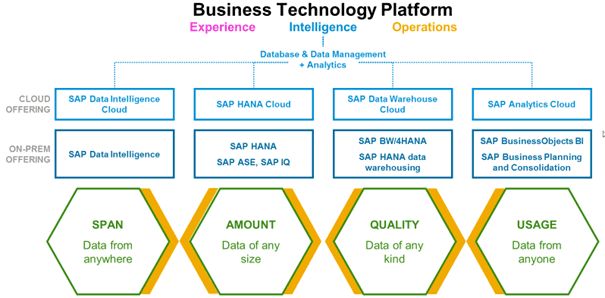
Source: SAP Learning
In my opinion, SAP has made a good, really significant move that now brings the SAP tool landscape for reporting in the right direction. It is important to note that this is not a data warehouse. For that, SAP has its own systems like the Data Warehouse Cloud or on-premises BW/4HANA.
Variant 1: SAC as a stand-alone solution named SAP Analytics Cloud (Enterprise)
The feature list of the 'big' SAC is long; here are a few highlights from my perspective:
- Connection to various sources is possible, making 'everything analyzable that one can imagine', including non-SAP
- Live data and import capability (data is stored in SAC)
- 'Digital Boardrooms' are possible
- Excel Add-In available
- Augmented Analytics with machine learning at numerous points
- Analytical Applications to programme your own applications (with JAVA)
- Planning with input-ready tables
And that is just a small excerpt. For a better overview, here is a graphic that contains even more features than those already mentioned:
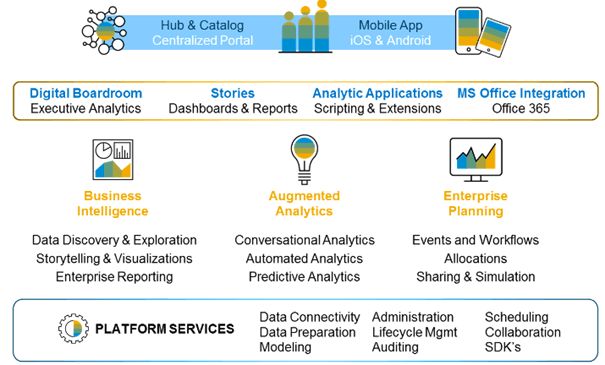
Source: SAP Learning
The SAC is accessed via a dedicated link in the browser. Depending on permissions, the navigation bar (left in black) will look different.
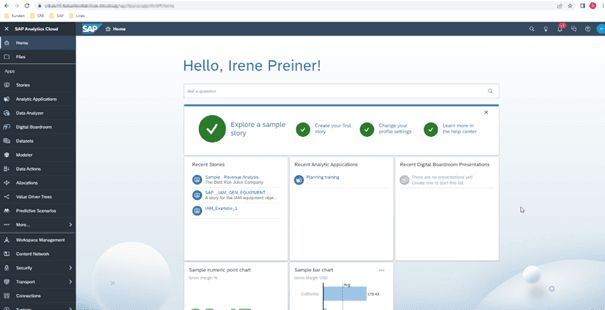
Source: SRB Demo System
One thing is clear: due to the extensive functions, the operation is not quite as intuitive as with the embedded SAC variants (see below). However, users who only need specific stories will not receive the complete menu as in my screenshot and will not create models. Since it is a dedicated reporting system, some preliminary work by administrators is necessary (data source connection, user creation, permissions, etc.). However, this also makes a wide range of reporting requirements feasible.
Variant 2: SAC embedded in S/4HANA and S/4HANA Cloud named SAP Analytics Cloud (OEM)
Perhaps you have already heard: S/4HANA and S/4HANA Cloud already have SAC 'in their belly'. In addition, there are a number of Fiori apps that serve reporting and now seamlessly integrate SAC. There are a few minor differences between S/4HANA and S/4HANA Cloud, but that would lead too far at this point.
So better again a graphic. The following one provides an overview for you of how SAC (OEM) is embedded in S/4HANA, nicely highlighted in the green box. Although the graphic mentions the SAP S/4HANA Cloud above, a similar applies to S/4HANA without Cloud.
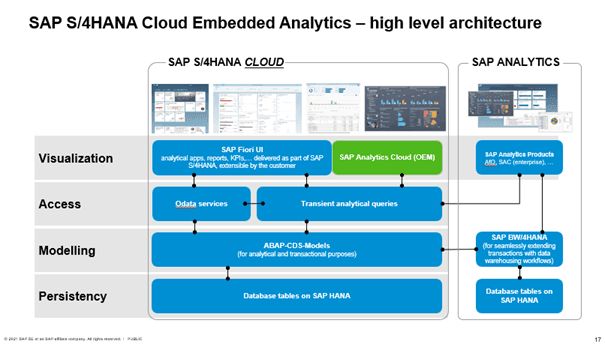
The key points summarised briefly:
- Only data from SAP S/4HANA can be analysed; no Excel or other data can be uploaded
- Users and permissions come via SAP S/4HANA
- Works only with live data (no separate data storage possible)
- Predefined business content available
- Seamless navigation between analytical and transactional apps possible
A good overview of all functions compared to the stand-alone SAC can be found here.
But what does the solution look like in the system? There is a dedicated app 'Manage KPIs and Reports'. Through this, stories can be created.
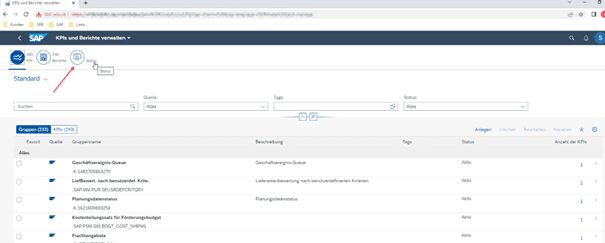
For this to work, some technical settings must be made at the very beginning, meaning the SAC (OEM) must be 'connected' to S/4.
The following graphic from SAP Best Practices illustrates how to proceed and which apps can be used. It starts with identifying the data source using the 'View Browser' app. If necessary, the CDS view is adjusted with the 'Custom CDS View' app. With 'Custom Analytical Query', the required fields are selected and filters set, also here if necessary. In step 4, you will see apps for designing analyses, including SAP SAC (OEM) and stand-alone SAC in the orange box. Steps 5, Publishing, and 6, Transport, complete the process.
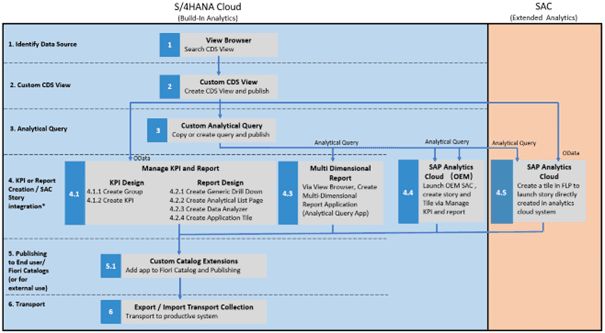
Conclusion: Great things are being offered in S/4HANA and S/4HANA Cloud. You can create stories and have all design options available. Together with the analytical apps, a comprehensive reporting on S/4 data can be built.
And just as a side note for all who want to know exactly what 'OEM' actually stands for? The abbreviation hides the words 'Original Equipment Manufacturer'. In our context, it simply means that an SAP product is embedded in another. For those who want to know exactly: this way!
Variant 3: SAC special for PAI customers free on AWS Hyperscaler named Standard Live in SAP PAI
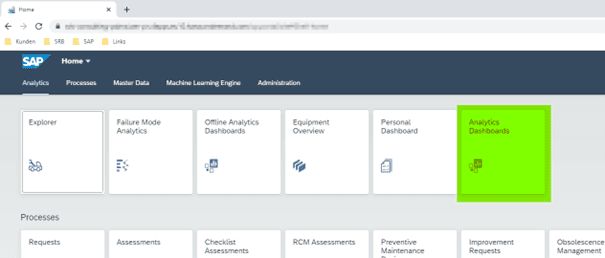
The PAI system is, as briefly mentioned above, a cloud system from SAP, orchestrated via the BTP (Business Technology Platform). Users access it via a URL in the browser. The SAP Intelligent Asset Management launchpad appears with the familiar tile look. At least that is still the case for now. Soon, probably in Q3 or Q4 2022, PAI is to become APM (Asset Performance Management). And how exactly SAC will be integrated there is still unclear.
In any case, I find the names in the current version very confusing. Fortunately, Reiner knows his stuff. The jump to the analyses occurs via the tile 'Analytics Dashboards'. When I asked him where the others were and if he could please give me 'proper' permissions, his answer was quite short: There is nothing else. Now I also understand why he said that everyone could do it without BI knowledge.
Source: SRB Demo System PAI
For the sake of completeness, it should be mentioned that there are still some analytics tiles that are pre-delivered dashboards from SAP (Explorer, Failure Mode Analytics + Offline, Equipment Overview, Personal Dashboard). However, these have existed since the beginning of the solution, even before SAC was available, and secondly, these are not SAC story solutions.
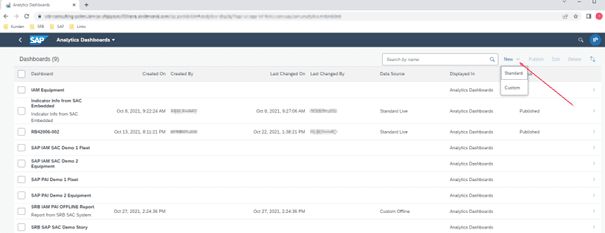
Just as easy as at the start, it continues: the available dashboards are simply listed, including demo examples from SAP. It gets exciting again when clicking on 'New'. Here, standard or custom can be chosen. What lies behind this?
Source: SRB Demo System PAI
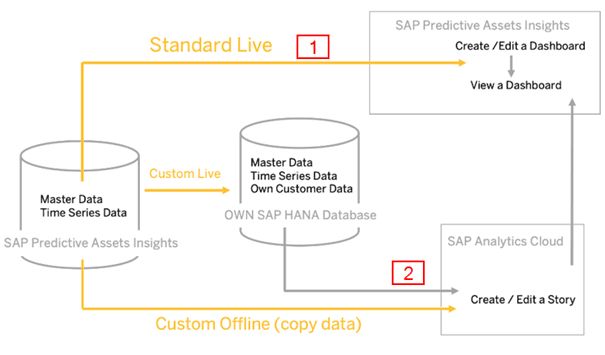
When selecting 'Standard', you remain in the configured SAC Standard Live of the PAI system, which in the following graphic is the connection 'Standard Live' with number 1.
With 'Custom' (if set up, Reiner of course did this), you set up a 'New Custom Dashboard'. This is then a link to an already existing story, so to speak a link into the stand-alone SAC (in the graphic number 2). This requires that PAI is connected to SAC (Custom offline or Custom Live via a HANA DB) to even create a story there.
Source: SAP Help
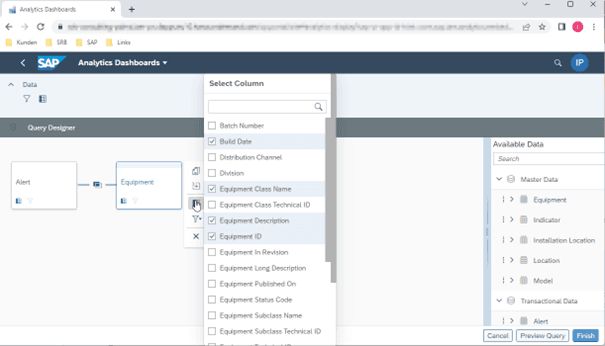
In any case, with the standard variant in PAI, you end up in the Query Designer.
Source: SRB Demo System PAI
I find it interesting that the name 'Query Designer' is used here. All BI professionals immediately think of Eclipse or the old BEX Query Designer. And the thought is not far off: here we have the available data on the right and now set the data basis for the story, i.e., which fields from the transactional and master data should be used for graphical preparation. This Query Designer is not comparable to Eclipse/BEX, as it is a graphical tool. With a little practice and experimentation, the tool is good and easy to use. With filters and connections, even intricate data combinations can be built.
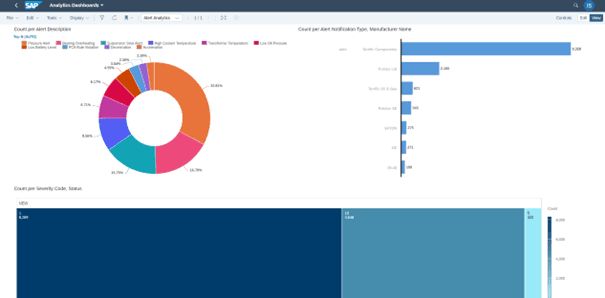
The tool also offers a 'Preview Query' for a preview of the selected data. Then it continues with 'Finish' – and from there as usual to design the story with charts, tables, etc.
Source: SAP Demo System
My conclusion on SAC variant 3 in PAI with Standard Live: Everyone needs a Reiner. No, joking aside. The variant is really very quick to learn and easy to use. However, there are restrictions. For example, only predefined data sources from PAI can be used. I have not seen an option to change or expand these. Much remains open when a stand-alone SAC is connected in the 'Custom' variant. However, additional licenses for SAC are required here.
SAC – the reporting future in SAP
For me, SAC is the tool for reporting in the SAP environment in the future – especially as it will be found embedded in various SAP products in many, perhaps unexpected places. Those who keep an eye on the differences between all the possible variants will simply find the best solution for their own usage purpose. As a service for you, here is a brief summary of the key features in tabular form:
| Merkmal | Variante 1 Stand-alone-SAC | Variante 2 SAC Embedded | Variante 3 SAC Spezial |
|---|---|---|---|
| Produkteinsatz | Kombinierbar mit allen SAP-Produkten | S/4HANA Cloud (S/4HANA on-premise) | SAP PAI (AWS Haperscaler) SAP APM (AWS & Azure Hyperscaler) |
| Datenquellen | Daten aus SAP- und non-SAP-Systemen | Nur Daten aus S/4HANA | Nur Daten aus SAP PAI |
| Datenhaltung | Live und Import Connection | Nur Live | Nur Live |
| Grafische Möglichkeiten | Kompletter Umfang | Kompletter Umfang | Kompletter Umfang |
| Planung | Möglich | Nicht möglich | Nicht möglich |
| Lizenzen* | Eigenes Servicemodell | In S/4HANA Service / Lizenzen inkludiert | In PAI Service inkludiert |
*for details, please contact your IT department or your SAP partner
If you want to know more, I invite you to check out one or another link or – better yet – to join us at our 6th BI Brunch on 22 September. I would be pleased to see you there. And of course, SAC will also be a topic there.


